
Data comparison analyzes and evaluates data sets to identify similarities, differences, and patterns. It involves comparing data from different sources or periods to gain insights and make informed decisions. In today’s data-driven world, data comparison is crucial in various industries and sectors, including finance, marketing, healthcare, and more.
The importance of data comparison in decision-making cannot be overstated. Organizations can identify trends, detect anomalies, and make data-driven decisions by comparing data. It helps identify patterns and relationships between variables, leading to valuable insights and strategic actions. Data comparison also helps identify errors or inconsistencies in data sets, ensuring data accuracy and reliability.
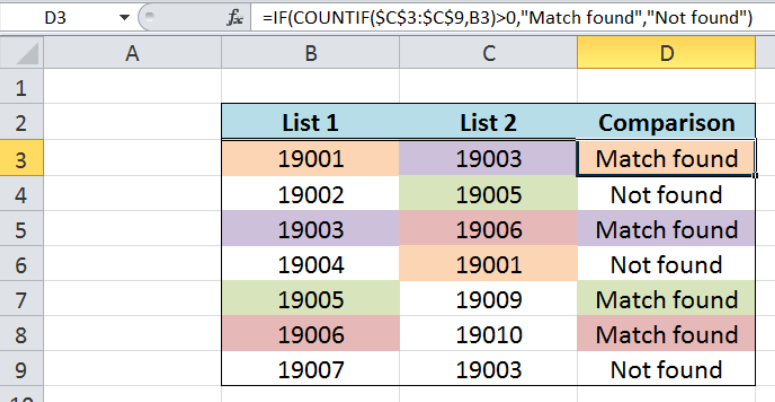
Understanding the Importance of Data Comparison
Several benefits of data comparison highlight its importance in decision-making. Firstly, data comparison allows organizations to identify trends and patterns that may not be apparent when looking at individual data sets. Organizations can uncover hidden insights and make more informed decisions by comparing multiple data sets.
Secondly, data comparison helps in detecting anomalies or outliers in the data. These anomalies can indicate errors or inconsistencies that need to be addressed. By identifying and resolving these issues, organizations can ensure the accuracy and reliability of their data.
Thirdly, data comparison enables organizations to benchmark their performance against industry standards or competitors. By comparing their data with external sources, organizations can better understand their position in the market and identify areas for improvement.
On the other hand, there are risks associated with not comparing data. Organizations may make decisions based on incomplete or inaccurate information without proper data comparison. This can lead to poor decision-making and missed opportunities. Additionally, organizations may fail to identify errors or inconsistencies in their data sets without comparing data, leading to unreliable information.
The Basics of Excel: An Overview
Excel is a powerful tool for data analysis and comparison. It is a spreadsheet program that allows users to organize, analyze, and visualize data. Excel offers many functions and formulas, making data comparison easier and more efficient.
It is important to understand the basic functions and formulas to get started with Excel. Functions are pre-built formulas that perform specific calculations or tasks. For example, the SUM function adds up a range of cells, while the AVERAGE function calculates the average of a range of cells.
Formulas, on the other hand, are user-defined calculations that perform specific operations on data. For example, the formula “=A1+B1” adds the values in cells A1 and B1. Formulas can perform complex calculations or manipulate data in various ways.
How to Set Up Your Excel Worksheet for Data Comparison
Before comparing data in Excel, it is important to format and organize your worksheet properly. This will make the data comparison process more efficient and accurate.
Formatting your worksheet involves adjusting the appearance of your data, such as font size, cell borders, and colors. This can make it easier to read and interpret your data. You can also apply conditional formatting to highlight specific values or patterns in your data.
Organizing your data involves structuring your data logically and consistently. This can include labeling columns and rows, using headers for each column, and ensuring each row represents a unique record or observation. You can easily navigate and compare different data sets by organizing your data properly.
Using Excel’s Built-in Functions to Compare Data
Excel offers several built-in functions that can be used to compare data. These functions allow you to perform basic comparisons between values or ranges of cells.
The IF function is one of the most commonly used comparison functions in Excel. The IF function allows you to test a condition and return different values based on whether the state is true or false. For example, you can use the IF function to compare two deals and return “Yes” if they are equal and “No” if they are not.
Another useful function for data comparison is the COUNTIF function. The COUNTIF function allows you to count the number of cells in a range that meet a specific condition. For example, you can use the COUNTIF function to count the number of cells that contain a certain value or meet certain criteria.
In addition to these basic comparison functions, Excel offers conditional formatting, allowing you to apply design to cells based on specific conditions. For example, conditional formatting can highlight cells greater than a certain value or containing particular text.
Advanced Techniques for Data Comparison in Excel
In addition to the basic functions and formulas, Excel offers advanced techniques for data comparison. These techniques can be used to perform more complex comparisons and analysis.
One such technique is the use of pivot tables. Pivot tables allow you to summarize and analyze large amounts of data flexibly and interactively. You can use pivot tables to compare data from different sources or periods and easily create visualizations such as charts and graphs.
Another advanced technique for data comparison in Excel is the use of VLOOKUP and HLOOKUP functions. These functions allow you to search for a value in a table and return a corresponding value from another column or row. This can be useful for comparing data from different sources or identifying matching values.
Tips and Tricks for Mastering Data Comparison in Excel
Several tips and tricks can help you master data comparison in Excel and become more efficient and productive.
One tip is to learn keyboard shortcuts. Excel offers keyboard shortcuts that save time and effort when performing common tasks. For example, pressing Ctrl+C copies selected cells, while pressing Ctrl+V pastes copied cells.
Another tip is to customize your Excel settings. Excel allows you to customize various settings to suit your preferences and workflow. For example, you can change the default font size, adjust the gridline color, or enable automatic calculation.
Common Errors to Avoid When Comparing Data in Excel
When comparing data in Excel, there are common errors that you should be aware of and avoid.
One common error is misaligned data. This can occur when data sets have different structures or formats, making it difficult to compare them accurately. It is important to ensure your data sets are properly aligned and organized before reaching them to avoid this error.
Another common error is incorrect formulas. This can occur when formulas are entered incorrectly or when cell references are not updated correctly. To avoid this error, double-check your procedures and ensure cell references are correct.
Best Practices for Data Comparison in Excel
To ensure accurate and reliable data comparison in Excel, there are several best practices that you should follow.
One best practice is to maintain consistency in formatting. This includes using consistent font sizes, cell borders, and colors across different data sets. Consistent design makes it easier to compare and interpret data.
Another best practice is to back up your Excel files regularly. This ensures you have a copy of your data in case of accidental deletion or file corruption. Regular backups can save you time and effort in case of data loss.
Putting Your Mastered Data Comparison Skills to Use
In conclusion, data comparison is a crucial process in decision-making that allows organizations to gain insights, identify trends, and make informed decisions. Excel is a powerful tool for data comparison, offering a wide range of functions and formulas that make the process easier and more efficient.
By understanding the basics of Excel, setting up your worksheet properly, and using built-in functions and advanced techniques, you can master data comparison in Excel. Following tips and best practices will help you avoid common errors and ensure accurate and reliable data comparison.
Mastering data comparison skills can have real-world applications in various industries and sectors. Whether you are analyzing financial data, comparing marketing campaigns, or evaluating healthcare outcomes, data comparison in Excel can help you make better decisions and achieve your goals. So, continue learning and practicing your Excel skills to master data comparison.
